
Stability AI for Enterprise: A Strategic Evaluation Guide

Why enterprise leaders need a clear lens on Stability AI right now
In 2026, business leaders face a big challenge: choosing the right AI tools from so many new ones. It can be hard to know which ones will truly help their companies grow and stay ahead.

This is especially true for companies looking at creative AI tools like Stability AI.
Stability AI, which many know for its Stable Diffusion image maker, has grown a lot. It’s no longer just about creating pictures. Now, Stability AI offers special solutions made just for businesses.
These solutions help with things like making product photos, creating marketing materials, and even producing video, audio, and 3D content. It has become a full creative platform for enterprise teams, aiming to speed up creative work at scale for companies in advertising, design, and more Generative AI Solutions to Accelerate Enterprise Creative ….
But how do you know if Stability AI is the best fit for your company? You need to look closely at its products, how its technology works, and any possible risks. You also need to think about how to bring these tools into your business and use them every day.
This article will give you a clear, easy-to-follow plan to check out Stability AI. We’ll help you understand its different tools, how they are built, what risks might come up, and important things to think about when buying and using them. Our goal is to make it simple for you to decide if Stability AI is one of the top AI tools for your company’s creative and enterprise needs.
To keep up with all the fast changes in AI and make smart choices for your business, you need good information every day.
The AI Newsletter Worth Reading is a great way to get clear daily AI updates.
To really understand if Stability AI is right for your business, you need to know what it is at its core. Stability AI started as a leader in creating images from text with its famous Stable Diffusion model. But in 2026, it has grown much bigger. Its main goal now is to be a top tool for businesses that need to create a lot of visual and audio content quickly and easily. Think of it as a creative powerhouse for enterprise teams.
Stability AI provides many powerful tools and models. Its flagship product, Stable Diffusion, is still a key part for making amazing images. But it doesn’t stop there. The company now offers models for creating video, like Stable Video Diffusion, and even audio with Stable Audio 2.5. They also have tools for 3D content, such as SPAR3D, making it a full creative platform covering images, video, audio, and 3D Stability AI Review 2026.
For businesses, Stability AI has a special platform called Brand Studio, which was launched in April 2026. This platform is designed to help marketing and advertising teams make visual content that perfectly matches their brand.

It uses custom AI models that learn a company’s specific style and rules, so everything created stays on brand Stability AI Updates: Stable Diffusion and Beyond. This shift shows how Stability AI is focusing on solving real business problems, moving beyond just open-source image generation to offer specialized services.
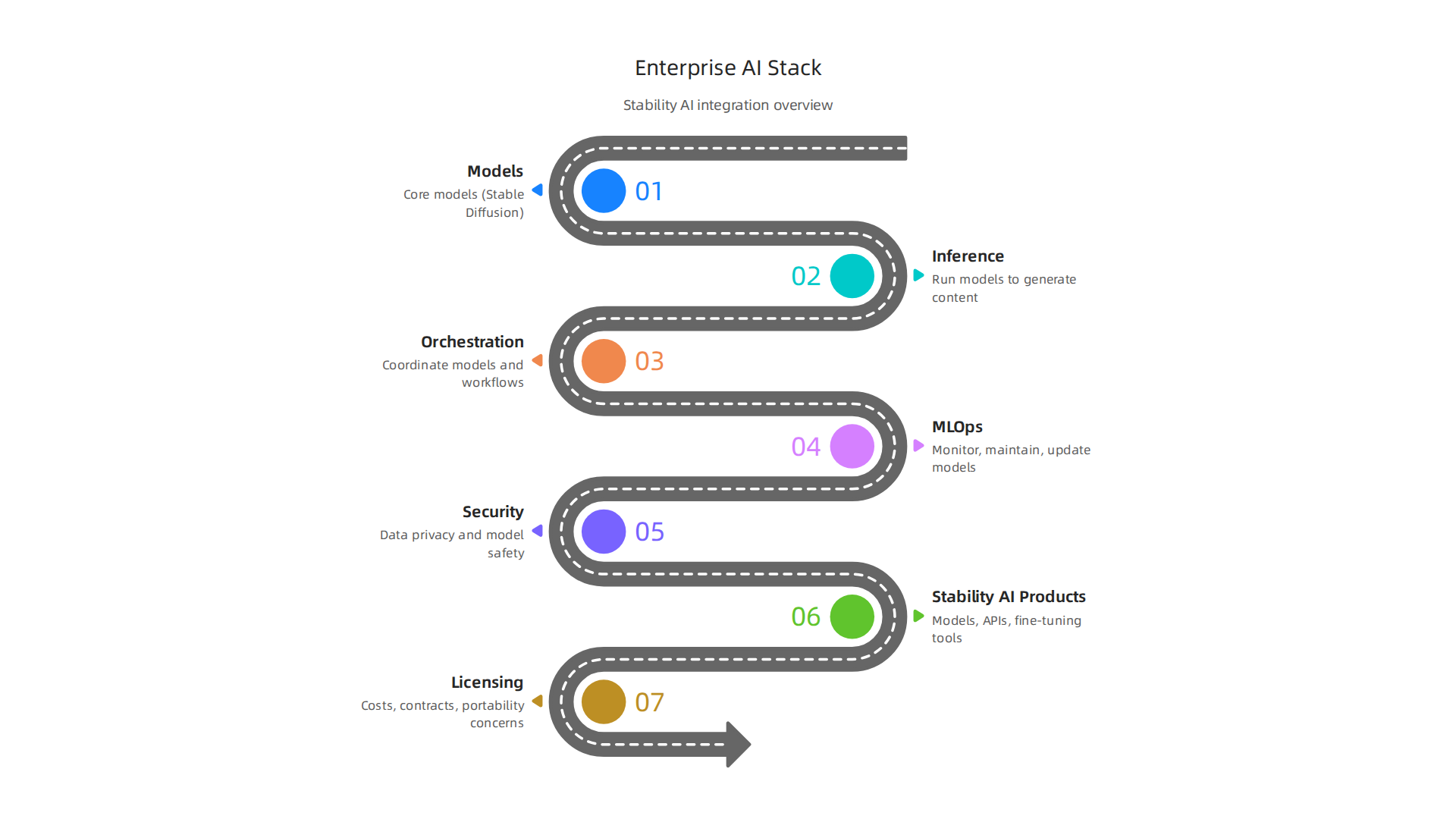
So, where does Stability AI fit into your company’s bigger AI picture? It fits into what we call the "enterprise AI stack."
This stack has different layers:
- Models: These are the "brains" of the AI, like Stable Diffusion or Stable Audio. Stability AI builds these powerful models.
- Inference: This is when the models do their work. For Stability AI, it means using its models to create images, videos, or audio from your commands.
- Orchestration: This is about managing how all these AI pieces work together with your company’s other tools and workflows. Stability AI’s Brand Studio helps with this by streamlining the creative process for large teams.
By offering these advanced models and tools, Stability AI helps companies speed up their creative work, making it one of the master generative AI tools for enterprise productivity. It acts as a key component in the creative part of the enterprise AI stack, allowing businesses to easily produce high-quality, on-brand content at a large scale.
Stability AI offers a full set of tools for businesses, not just basic image making. Their products fall into a few key areas that help companies create content, work smarter, and build new things.
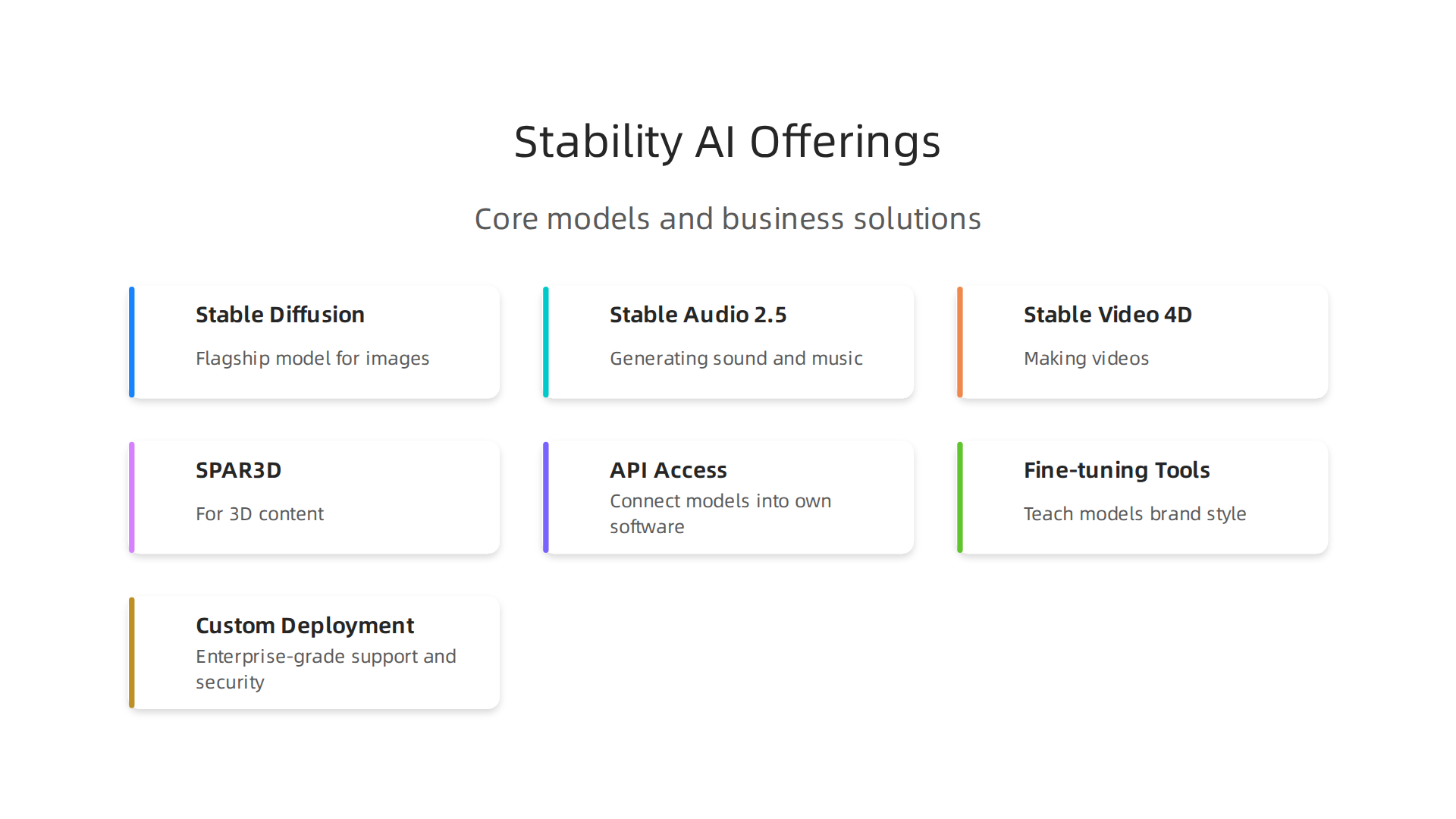
First, there are the core AI models. These are the powerful engines that create content. You’ve heard of Stable Diffusion for images, which is still a flagship product. But they also have Stable Audio 2.5 for generating sound and music, and Stable Video 4D 2.0 for making videos. There’s even SPAR3D for 3D content. These models are the building blocks for many creative tasks within a company Stability AI – Company Profile – HokAI. The company keeps updating these models, with recent improvements like Stable Diffusion 3.5 offering better understanding and control for images Stability AI 2026: The Leading Open Generative AI Platform.
Beyond these core models, Stability AI provides solutions designed especially for businesses. They offer API access, which means companies can connect Stability AI’s powerful models directly into their own software and systems
Stability AI: Usage, Revenue, Valuation & Growth Statistics. This is great for companies that need to create a lot of content automatically. They also have fine-tuning tools, which let businesses teach the AI models to understand their specific brand style or content needs. Imagine an AI that learns to make images exactly how your brand would. For big companies, there are custom deployment options and enterprise-grade support, including security features like SOC 2 Type II compliance Stability AI revenue, funding & news | Sacra. All of these capabilities are packaged as "Stability AI Solutions," built to speed up creative work for businesses Generative AI Solutions to Accelerate Enterprise Creative ….
So, how do businesses actually use these offerings? Many companies use Stability AI for content generation. This includes creating product photos with different backgrounds and models, making marketing videos, or even generating new advertising ideas. These tools help teams create more content much faster than before, all while keeping it on brand.
Another use case is search augmentation. This is where AI helps improve how people find information. For example, if you search for an item, AI could generate visual examples based on your text. This can make search results much richer and more helpful.
While Stability AI is strong in creative content, its underlying AI models can also support the development of virtual assistants. By integrating audio and language models, businesses can build more advanced virtual assistants that can understand and respond with both text and generated speech, making them feel more natural and helpful. Selecting the right top AI tools, and knowing how to unlock enterprise value from your AI personal assistant in 2026, is key for business leaders.
The ability to create high-quality, on-brand content at scale makes Stability AI a strong choice for businesses looking to boost their creative output and efficiency. If you want to stay updated on the latest in enterprise AI, including tools like Stability AI, there’s a valuable resource available.
The AI Newsletter Worth Reading
To make all of this happen, businesses need to understand how Stability AI’s technology is put together and how it’s delivered. This involves knowing about the different AI models, how to use their APIs, and where to set up or "deploy" these tools.
Technical Architecture: Models, APIs, and Deployment Options
Stability AI offers its powerful AI models in ways that businesses can easily use. These models are the brains behind creating images, sounds, and videos. To get these models working for a company, there are a few main paths.
One common way is through API access. Think of an API as a special doorway that lets a company’s own software talk directly to Stability AI’s models. This means businesses can build Stability AI tools right into their own apps or workflows. It’s a key part of how companies use these top AI tools to create content automatically. For example, using a serverless API means businesses can pay only for what they use, without having to host the models themselves, while still keeping their data secure How to deploy Stability AI family of models with AI Foundry – Azure AI Foundry.
Beyond APIs, businesses also choose different ways to deploy Stability AI’s models.
- Cloud Deployment: Many companies use cloud services like Amazon Web Services (AWS) or Google Cloud. These services offer the powerful computer parts, like GPUs, that AI models need to run quickly What Is Stable Diffusion 3? Stability AI’s Next-Gen Image …. This is often flexible and can grow with the company’s needs. For more on this, you might explore the cloud provider ecosystem enterprise strategy for 2026.
- On-Premises Deployment: Some bigger businesses prefer to run Stability AI models on their own computers and servers, right in their own buildings. This gives them full control over everything, which can be important for security or very specific needs Stability AI Release Notes – May 2026 Latest Updates. This type of setup is also called "local deployment" Stability AI in 2026: What’s New with Open-Source AI Models.
When putting these AI tools to work, companies also think about how to integrate them smoothly.
- Inference: This is simply when the AI model creates its output, like generating an image from a text description.
- Batching: Instead of creating one image at a time, businesses can send many requests at once. The AI processes them together, which saves time and computer power.
- Latency: This refers to how fast the AI responds. For things like virtual assistants, low latency is important so the user doesn’t have to wait. Real-time AI use needs very low latency What is AI Model Deployment? Methods, Uses & Best ….
- Scaling: As a company grows or needs more AI power, they need to be able to handle more requests. This might mean using more powerful computers or adding more AI models to share the work. Building systems that can scale easily is key for maintaining overall AI Inference Scales into Production in 2026.
Understanding these parts of Stability AI’s technical setup helps businesses make the best choices for their creative and operational goals, setting them up for success in using generative AI.

To dive deeper into how to plan for and carry out large-scale AI projects, consider exploring mastering massive AI enterprise strategy and implementation in 2026.
After setting up and using AI models, a very important part that businesses must think about is how secure everything is. This means looking at security, making sure rules are followed, and understanding any risks. When you use powerful tools like Stability AI, these steps become even more important.
Security, Compliance, and Risk Considerations
Using AI in your business brings new chances for growth, but also new things to watch out for. Companies need to protect their information, make sure the AI works fairly, and follow important rules.
Key Enterprise Security Concerns
- Data Privacy: When you send information to AI models, especially sensitive data, you must make sure it stays private. Whether you run the AI on your own computers or use a cloud service, your data needs to be safe. Businesses should always check how their chosen AI solution handles their information Stable Diffusion, Security, Risk & Compliance. Sharing private data with AI models that are not secure is a big risk, and bad prompts can even lead to data exposure AI Security for Enterprises.
- Model Safety: AI models themselves can have security problems. For example, some people might try to "trick" the AI into giving wrong or harmful answers. This is called an adversarial attack. There’s also the risk of "data poisoning," where bad data is fed into the AI during its training, making it behave badly later The Top AI Security Risks Facing Enterprises in 2025. Ensuring the AI’s output is controlled and safe is vital.
- Supply Chain Risks: Modern businesses often use many different tools and services together. When you use Stability AI’s models, you might also use other tools or data from different places. This chain of suppliers can create weak spots. If one part of the chain is not secure, it can affect your whole system Stability AI — ThreatNG Security – Digital Risk Protection. New AI systems can make these existing weaknesses even worse Emerging Enterprise Security Risks of AI. This expands how bad actors might try to break into systems 7 Enterprise AI Security Risks to Manage.
Compliance and Auditability
Businesses must also make sure they follow specific rules and laws, called compliance. This is about being able to show that your AI systems are fair, transparent, and secure. For vendors like Stability AI, achieving special certifications shows they meet high standards for security and data protection. For example, Stability AI has achieved SOC 2 Type II and SOC 3 compliance, which means independent groups have checked their security controls and found them strong Stability AI Achieves SOC 2 Type II and SOC 3 Compliance, Reaching New …. This kind of compliance is key for trust, especially when using top AI tools.
Companies should always check if the AI tools they use offer clear privacy policies and safety information. Stability AI, for instance, has a dedicated safety team to handle any misuse Stable Safety. Building trust in AI systems also involves having human oversight and guardrails to manage risks building enterprise AI trust with human oversight and guardrails. When evaluating AI companies in 2026, CIOs and CTOs should always look at these security and compliance aspects carefully how CIOs and CTOs should evaluate AI companies in 2026.
Staying on top of these security, compliance, and risk matters is just as important as the technology itself. It helps businesses use AI safely and effectively.
Get clear daily AI updates from The Deep View Newsletter.
The AI Newsletter Worth Reading
After making sure your AI systems are secure and follow all the rules, the next big step is putting them to work. This is where you integrate tools like Stability AI into your daily business and keep them running smoothly. It’s not just about turning them on; it’s about managing them over time.
Practical Steps for Integrating Stability AI Models
Bringing AI models into your business means fitting them into your existing systems. For Stability AI, there are a few main ways to do this:
- Running Locally (On-Premises): Some businesses want to keep full control over their data and AI tools. They can run Stability AI models on their own computers or servers. This means all the processing happens within their own setup, which can be great for data privacy and security Stability AI Release Notes – May 2026 Latest Updates. You might use tools like ComfyUI or Automatic1111 for local use, which are popular in 2026 for models like Stable Diffusion Stability AI in 2026: What’s New with Open-Source AI Models.
- Using Cloud Services: Many companies choose to use cloud platforms like Amazon Web Services (AWS), Google Cloud, or Microsoft Azure. These services provide the powerful computers (like GPUs) needed to run advanced AI models. This way, you don’t have to buy and maintain all the hardware yourself. You can deploy Stability AI models as a serverless API, meaning you only pay for what you use, without having to host them fully How to deploy Stability AI family of models with AI Foundry – Azure AI Foundry.
- Hosted Inference Services: There are also specialized services that host AI models for you, like Replicate or RunPod. These services make it easy to use Stability AI by just calling an API (Application Programming Interface). It’s a simple way to get powerful AI features without managing any servers. In 2026, both managed cloud APIs and local hosting are common ways to use Stable Diffusion Stable Diffusion 2026: Model Specs & VRAM Hardware Guide.
No matter how you deploy, the goal is to make sure the AI fits well with your current business processes. This is key for things like sales, marketing, and customer service. You might even use other top AI tools or hire virtual assistant companies to help manage these integrations. Thinking about how the AI will connect with everything else from the start helps you avoid problems later on. Businesses need a roadmap to manage these complex deployments The Enterprise AI Playbook.
Operational Best Practices: MLOps, Monitoring, and Maintenance
Once your Stability AI models are up and running, the work isn’t over. You need to keep an eye on them to make sure they’re doing what they should. This is where MLOps comes in, which is like DevOps for machine learning.

It’s a set of practices for managing the full lifecycle of AI models.
- Monitoring Performance: Just like any other software, AI models need to be watched. You want to see if they’re giving accurate results, working quickly enough, and not costing too much. Tools help you track these things. For example, if you use a Stability AI image model, you’d monitor the quality of the images it creates over time.
- Detecting Drift: AI models learn from data. But data can change over time. Think about new trends or customer behaviors. If the real-world data starts to look different from the data the AI was trained on, the model’s performance might suffer. This is called "model drift," and you need systems to detect it early.
- Cost Management: Running powerful AI models can be expensive, especially on cloud services. Monitoring helps you see how much you’re spending and find ways to save money, maybe by adjusting how much computing power you use.
- Regular Maintenance and Updates: AI models are not "set it and forget it." They need regular check-ups, updates, and sometimes re-training with new data to stay effective. This keeps them relevant and helps them improve over time. Enterprises in 2026 treat AI as an operating model issue, not just a simple software add-on Deloitte State of AI: 2026 Key Takeaways.
Building a strong operational plan ensures that your investment in Stability AI continues to pay off. It also helps maintain the stability of your enterprise systems, which can be harder to do as AI becomes more complex Navigating AI Complexity: Maintaining Stability in Enterprise ….
If you want to dive deeper into how businesses are mastering AI, check out our guide on Mastering Massive AI Enterprise Strategy and Implementation in 2026.
After you have your AI systems in place and working well, it’s time to think about the money side of things. For businesses, this means understanding the costs, how you can use the software (licensing), and making sure you don’t get stuck with one provider.
Procurement teams play a big role here, as they need to look closely at these details for tools like Stability AI.
How Stability AI Licensing Works
Stability AI offers different ways to use its powerful models, and each comes with its own rules and costs.
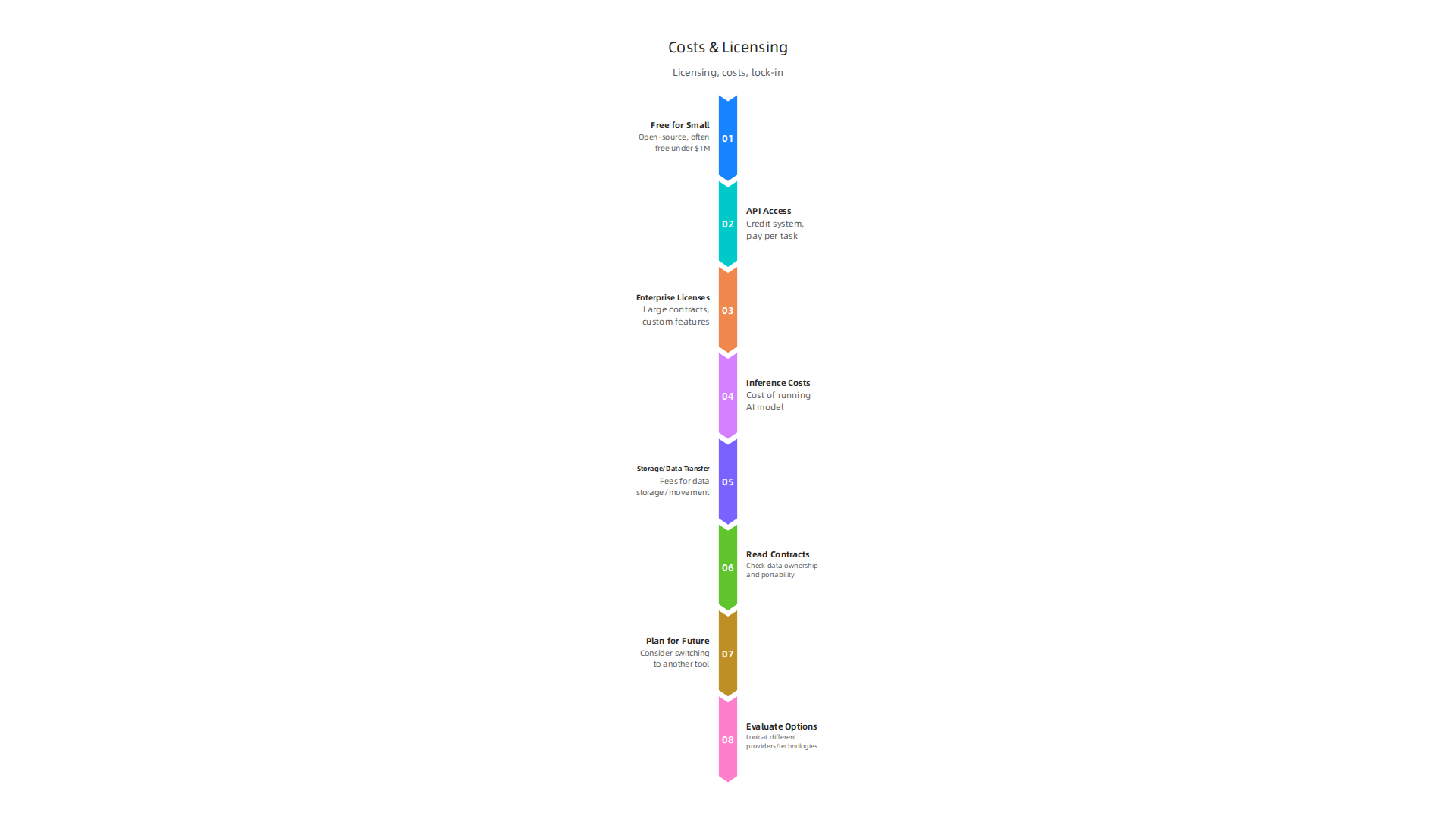
- Free for Small Uses: Many Stability AI models are open-source. This means you can often use them for free if your business is small or if you’re not making a lot of money from them (like under $1 million a year). This is a great way to try out the technology without a big upfront cost.
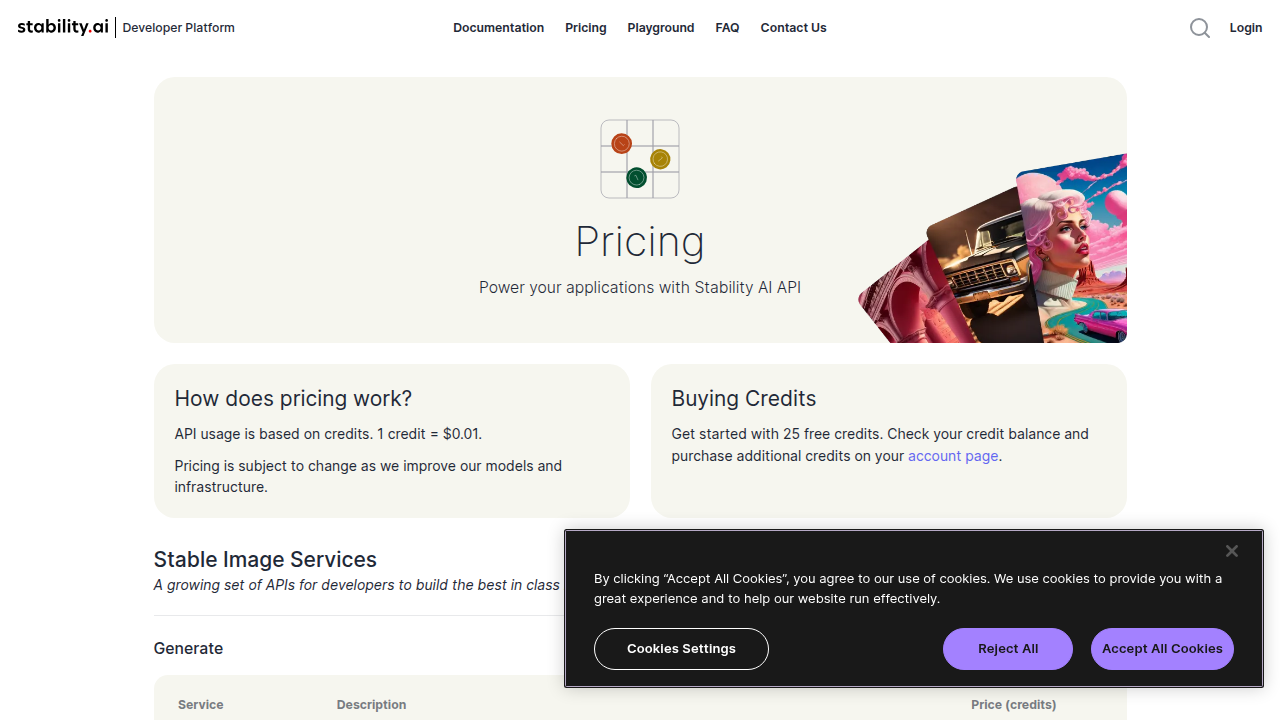
- API Access: If you need to use Stability AI models in your own apps or services, you can often do so through an API. This usually works on a "credit" system. For example, in 2026, one credit might cost you $0.01, and you pay based on how many images or tasks the AI completes for you Stability AI – Developer Platform. Many plans offer a set amount of credits for a monthly fee.
- Enterprise Licenses: For larger companies, Stability AI offers special licenses. These are like big contracts that let you use their models inside your company’s own systems. These contracts can cost a lot each year, sometimes from $50,000 to over $500,000, depending on how much you use the AI and what special features you need Stability AI Revenue Model: How Stability AI Makes Money in 2026. This is especially true for creative teams using custom versions of Stable Diffusion How’d you fix Stability AI’s revenue issues in 2026?.
Watching for Hidden Costs
When you buy or use AI services, the price tag isn’t always the full story. Procurement teams need to look out for "hidden" costs.
- Inference Costs: This is the cost of actually running the AI model to get results. Every time Stability AI makes an image or helps with a task, it uses computing power, and that costs money. For example, creating one image with Stability AI’s Stable Image Ultra can cost around $0.08 Stability AI Review 2026: Models, API Pricing, Licensing. If you make thousands of images, these costs add up fast.
- Storage and Data Transfer: If you store lots of data with a cloud provider or move data in and out of their systems, these can have their own fees. These are important to factor in when planning your budget.
Avoiding Vendor Lock-in
It’s super important not to get stuck with one AI provider. This is called "vendor lock-in." If it’s too hard to switch to another tool later, you might end up paying more or missing out on better options.
To avoid this, procurement teams should:
- Read Contracts Carefully: Look for terms about data ownership and how easy it is to move your data and AI models if you decide to leave.
- Plan for the Future: Think about what would happen if you needed to stop using Stability AI or any other of the top AI tools. Can you take your work with you? Can another AI tool, perhaps like Creatify AI, step in easily?
- Evaluate Options: Always look at different providers and technologies. This helps you choose the best fit and keeps your choices open. Learning how CIOs and CTOs should evaluate AI companies in 2026 can make a big difference here.
Staying informed about the fast-changing world of AI is crucial for making smart choices.
Get clear daily AI updates. The AI Newsletter Worth Reading delivers insights right to your inbox.
When it comes to choosing AI tools, thinking about what you need is key. While Stability AI is a strong choice, especially for creative work, it’s wise to look at other options too.

This helps you pick the best fit for your business in 2026.
How to Compare Stability AI with Other Tools
Comparing different AI tools means looking at a few important things. This helps you see if Stability AI or another provider is right for your company.
- How Accurate and Good Are the Results?
Different AI tools are better at different things. For example, Stability AI is known for making great images. But if you need an AI for writing text or helping customers, you might look at other top AI tools or virtual assistant companies. Test a few options to see which gives the best quality for your specific tasks. - What Does It Really Cost?
We’ve talked about Stability AI’s costs, but other tools have their own pricing. Some might have lower upfront costs but higher "pay-as-you-go" fees. Others might offer different types of plans. Always compare the total cost over time, including those hidden fees we discussed. For example, some tools like Stability AI offer free credits to start, while others might have a simple monthly fee Stability AI Pricing 2026. - How Well Does It Work with Your Current Systems?
A new AI tool should easily connect with the software you already use. This is called integration. If a tool doesn’t connect well, it can cause a lot of extra work. Check if the AI tool has easy ways to link up with your existing workflows and data. - Who Controls the Data and How Safe Is It?
This is called governance. It’s about how your data is used, stored, and protected by the AI provider. Make sure any tool you pick meets your company’s rules for privacy and security. You want to know your information is safe.
A Checklist for Choosing AI Tools
When your team is looking at AI options, use this simple checklist. It can help you make a smart choice, whether it’s for Stability AI or an alternative like Creatify AI.
- Try It Out First (Proof-of-Concept): Before buying, try the AI tool on a small project. This "proof-of-concept" lets you see if it truly works for your needs.
- Check Security: Have your security team look at the AI tool. They can make sure it keeps your company’s data safe and secure.
- Talk About Agreements (SLA Negotiation): An SLA (Service Level Agreement) is like a promise from the provider about how well their service will work. Make sure these promises match what your business needs.
- Look at Support: What kind of help does the AI company offer if something goes wrong? Good customer support is very important, especially for complex tools.
- Understand the Market: Keep an eye on what other companies are doing. Knowing the competitive landscape of Stability AI can help you see where it stands compared to others.
By following these steps, your company can choose AI tools, including powerful options like Stability AI, that really help your business grow and succeed in 2026.
Summary
This article explains why enterprise leaders should take a clear, practical look at Stability AI in 2026 and how to evaluate it as part of a company’s creative and enterprise AI strategy. It describes Stability AI’s evolution from the Stable Diffusion image model into a broader suite that includes video, audio and 3D models plus business offerings like Brand Studio and APIs for integration. The piece walks through where Stability AI sits in the enterprise AI stack (models, inference, orchestration), the main deployment approaches (cloud, on‑premises, hosted inference), and how teams should plan integration and operational upkeep. It highlights security, compliance and supply‑chain risks to vet—plus certifications and governance you should check. The article also covers licensing, cost drivers and how to avoid vendor lock‑in, and gives procurement and technical checklists for proof‑of‑concepts and SLAs. After reading, leaders will know what technical, legal and operational questions to ask, how to test Stability AI in their workflows, and how to compare it to alternative AI tools for enterprise needs.