
Optimize AWS Redshift for Enterprise Data Strategy in 2026
Introduction: Why AWS Redshift Still Matters for Enterprise Data Strategy
In 2026, companies need to make smart choices about their data. Data helps businesses understand their customers, improve products, and make better plans. This is why having a strong data strategy is so important. When we talk about handling huge amounts of business information, a special kind of tool called a data warehouse comes to mind. The market for cloud data warehouses, where data is stored and managed online, is growing fast. It was valued at $16.53 billion in 2026 and is expected to grow even bigger by 2034, showing just how important these systems are for companies around the world Cloud Data Warehouse Market Size, Share, Growth, Trends, 2034.
Among these important tools, AWS Redshift stands out. It’s a key part of many businesses’ cloud setup, especially for those using Amazon Web Services.
AWS Redshift is built to help companies store and quickly analyze very large datasets. Think of it as a super-fast brain for your business data, helping you with complex tasks like data mining to find hidden patterns and insights. It uses a special architecture that works in parallel, letting it process lots of information at once Technology-best-practices/big_data/redshift/README.md at master · vaquarkhan/Technology-best-practices.
For leaders like CIOs, CTOs, and product managers, picking the right AWS data warehouse is a big decision.

AWS Redshift offers strong performance, especially for certain types of data analysis. It’s known for being cost-effective when set up correctly and can be scaled up or down as your company’s needs change. However, it’s also important to think about how it fits with other tools in your AWS cloud storage ecosystem. Some other cloud data approaches might offer more flexibility for different kinds of data or cost models. For instance, sometimes a "data lakehouse" approach, which combines features of data lakes and data warehouses, might be considered. Actually, a 2024 survey showed that more companies moved to data lakehouses from cloud data warehouses than from any other setup 2024 – State of the Data Lakehouse. This shows there are always new options to explore in the world of building enterprise data architecture.
Understanding these tradeoffs is crucial for making smart decisions about your enterprise data strategy in 2026 and beyond.
Stay updated on the latest shifts in enterprise technology and AI.
The AI Newsletter Worth Reading
1. Strategic Benefits and When to Pick Redshift
When companies decide how to manage their data, they look for tools that offer clear benefits.
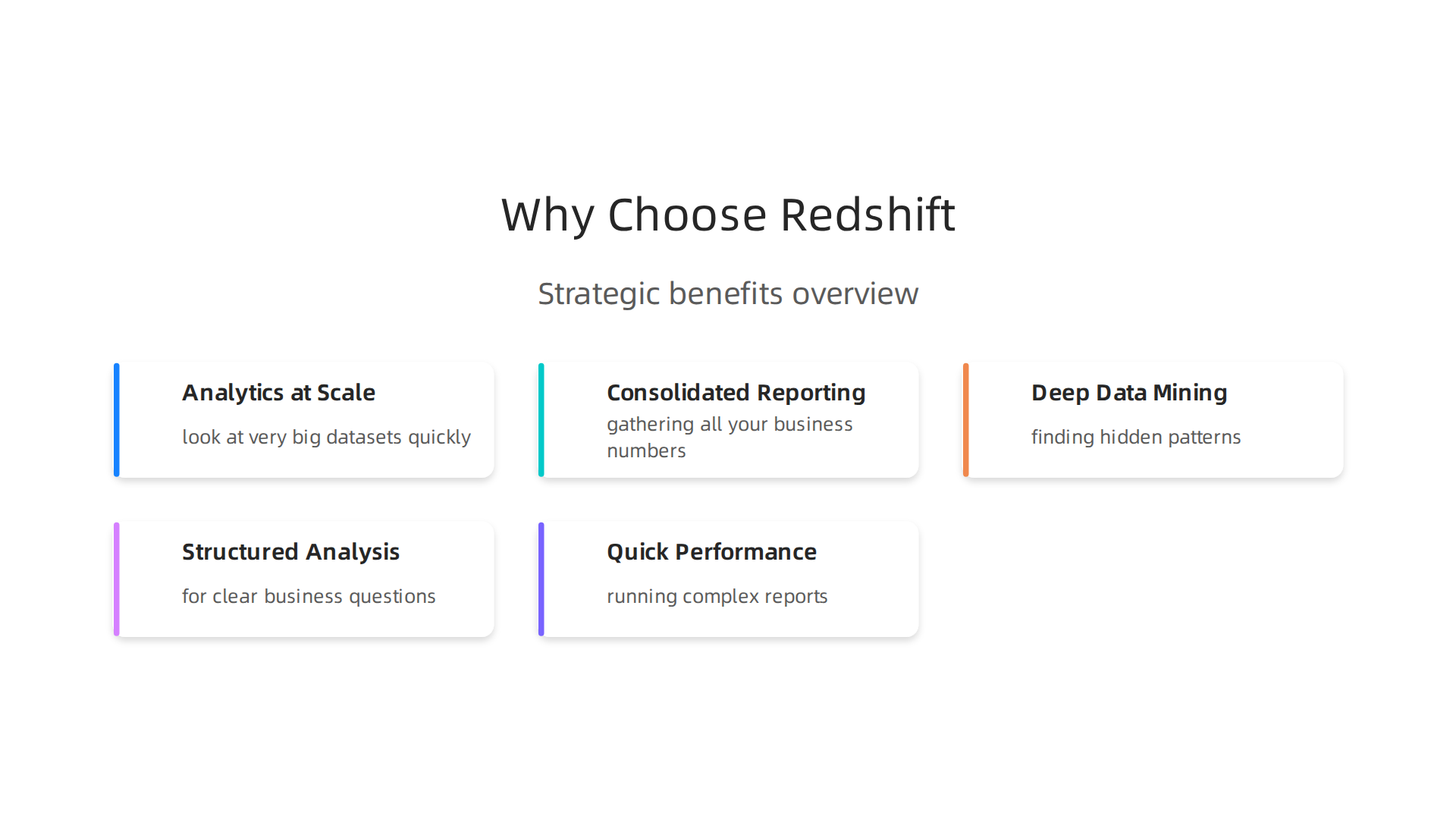
AWS Redshift is a strong choice for many because it helps businesses get valuable insights from huge amounts of information. For example, it lets companies perform analytics at scale. This means they can look at very big datasets quickly to find trends and make smarter decisions. Imagine a big store wanting to see what all its customers bought last year across all locations. AWS Redshift can handle that kind of big task.
Another key benefit is consolidated reporting. This means gathering all your business numbers into one easy-to-read report. Instead of checking many different places, leaders can see everything in one spot. This helps them understand how the business is doing overall. AWS Redshift makes this simple, which is very important for managers in 2026. Plus, it can work well with data lakes, which are like big storage areas for all types of raw data. This setup helps companies do deep data mining, finding hidden patterns that can lead to new ideas or products. Many IT executives are focused on building a cloud data lake or data warehouse to achieve these goals
Must-Know Stats: Cloud Data Warehouse Modernization.
So, when is AWS Redshift the best choice for your enterprise? It’s a great fit if your company primarily needs to do powerful, structured data analysis. This means you have clear questions you want to ask your data, like "What were our sales last quarter by region?" or "Which marketing campaigns worked best?" AWS Redshift is built for these kinds of specific queries and large-scale reporting. It’s often chosen for its quick performance when running complex reports over many different tables of data.
However, in 2026, it’s also important to know when other tools might be better. If your company works with many different kinds of data, like videos, images, or sensor data, and you want to do more flexible exploration without a fixed plan, a data lakehouse or other types of AWS cloud storage might be a better option. Lakehouses are becoming very popular, with a 2026 report showing that many businesses are building them to deliver analytics Data, BI and Analytics Trend Monitor 2026. Also, if your data needs are smaller or change a lot, a more flexible or cheaper option could be considered first. Choosing the right tool depends on your specific goals and how you plan to use your data within your overall cloud provider ecosystem enterprise strategy for 2026.
AWS Redshift truly shines for businesses that need a dedicated, high-performance solution for their structured analytical workloads, ensuring they can always make fast, data-driven decisions.
2. Architectural Patterns: Redshift in Modern Cloud Data Platforms
We just talked about how AWS Redshift helps businesses use their data for smart decisions. Now, let’s look at how AWS Redshift actually fits into a company’s larger data setup. Think of it like a special room in a big house. There are different ways to build that room and connect it to other parts of the house.
Redshift in Different Data Setups
In 2026, companies often use AWS Redshift in a few main ways:
- Redshift as Your Main Data Brain: Some companies use AWS Redshift as their primary data warehouse. This means it’s the central place where all their important, structured data goes for analysis. All the daily sales numbers, customer info, and other organized data live here. It’s built for fast reporting and answering specific business questions.
- Redshift with a Data Lake (The Lakehouse Idea): Many businesses today combine AWS Redshift with a "data lake." A data lake is like a huge storage pond for all kinds of data, even messy or unorganized stuff like videos, pictures, or sensor data. When you put Redshift (a structured data warehouse) together with a data lake (for raw data and flexible storage, often using AWS cloud storage like Amazon S3), you get what people call a "lakehouse." This setup lets you store everything and then use AWS Redshift to do powerful, structured analysis on the data you need. This mix helps companies do deep data mining more easily. Experts share many ways to set up Amazon Redshift to work well at a large scale Architecture patterns to optimize Amazon Redshift performance at scale.
- Working with Other Clouds (Hybrid and Multi-Cloud): Some very large companies use different cloud services or even their own computer systems along with AWS. AWS Redshift can still be a part of these bigger, more complex setups. It can connect with data living in other places, making it a flexible piece of a company’s overall data strategy.
How Data Moves In and Out of Redshift
To make AWS Redshift useful, data needs to flow in and out of it smoothly. This involves several "integration points":
- Getting Data In (Ingestion): Data can come from many places. It might be from apps your company uses, like Salesforce or Workday. It could also come from other databases, website forms, or even real-time streams of information from things like smart sensors
Amazon Redshift Integration Guide 2026: Build AI-Powered ….
* Streaming Data: For data that arrives all the time, like website clicks or IoT device readings, special tools help bring it into AWS Redshift quickly.
* Batch ETL/ELT: For larger chunks of data, processes called ETL (Extract, Transform, Load) or ELT (Extract, Load, Transform) are used. These steps clean up and prepare the data before it’s loaded into your AWS data warehouse. Tools like AWS Glue are often used here. It’s all about building smart ways to handle data moving through your systems Data pipeline 2026 blueprint for building real-time reliable infrastructure.
- Using Data for Reports and AI (Output): Once data is in AWS Redshift, it’s ready to be used.
- Business Intelligence (BI) Tools: These are programs like Tableau or Amazon QuickSight that help people create charts, dashboards, and reports from the data. This lets business leaders see trends and make quick decisions.
- AI and Machine Learning: The clean, organized data in AWS Redshift can also be sent to special AI tools, like AWS SageMaker. This helps build smart systems that can predict future sales, personalize customer experiences, or automate tasks. Thinking about how to make AI work for your business is a big part of enterprise strategy in 2026 Best AI for Business 2026: Enterprise Strategy Guide.
Putting all these pieces together creates a powerful modern cloud data platform. AWS Redshift acts as a key player, especially for making sense of large, structured datasets. Following good practices for integrating Redshift into your overall AWS setup is important for efficient data flow Redshift Integration Best Practices for Your AWS Ecosystem.
When you have your AWS Redshift data warehouse set up and data flowing into it, the next big step is to make sure it runs super fast and handles all your questions without a hitch. This is called performance optimization and workload management. Think of it like tuning a race car. You have to adjust many parts to get the best speed and control.
Making AWS Redshift Run Faster
Optimizing AWS Redshift means making your data queries run quickly and efficiently. Here are some important "knobs" you can adjust:
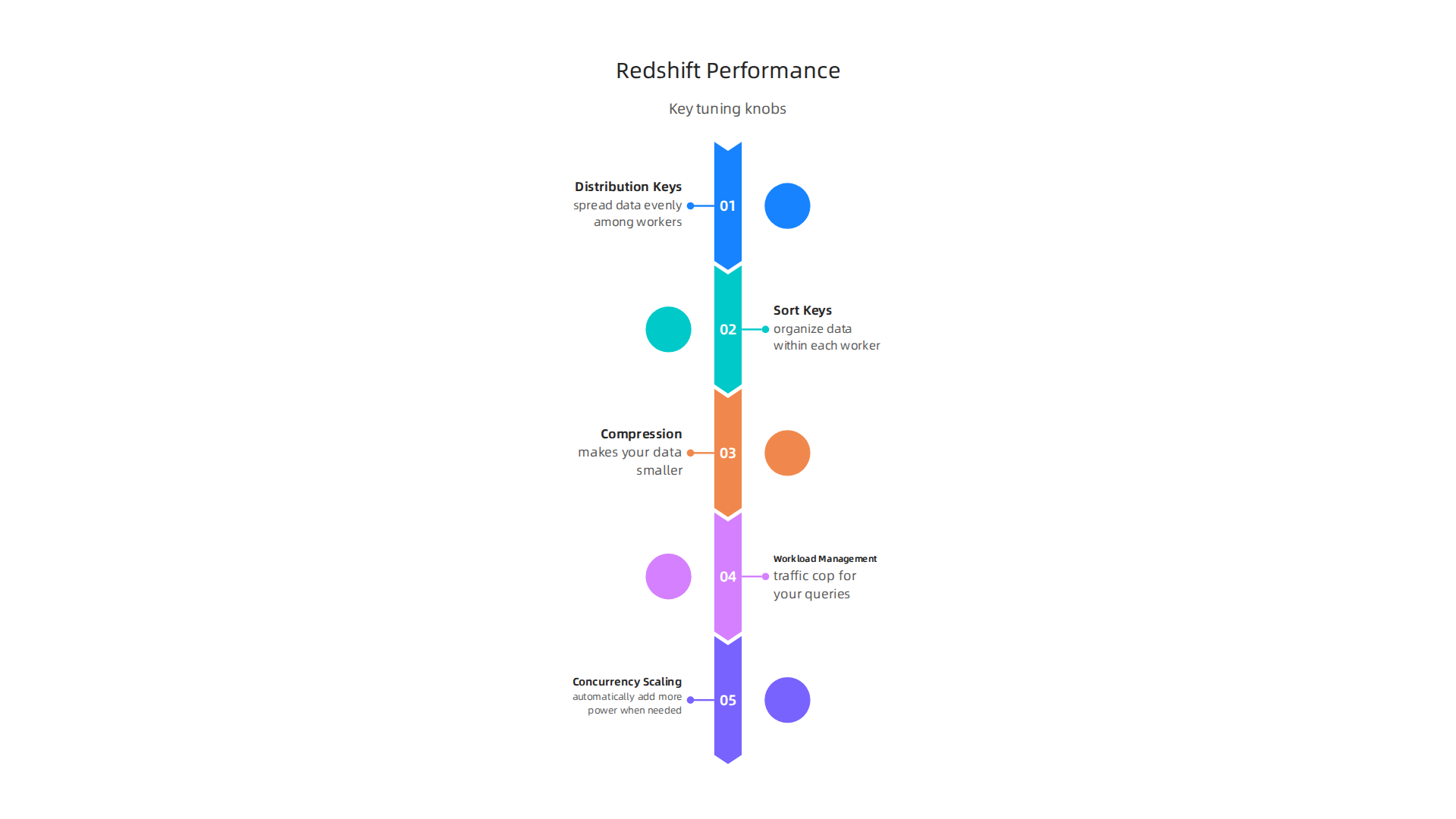
- Distribution Keys: Imagine you have many small workers (nodes) handling your data. Distribution keys tell AWS Redshift how to spread your data evenly among these workers. If data is spread well, each worker can do its part at the same time, making queries much faster. Choosing the right distribution key is super important for good performance, as it can make a huge difference in how fast your queries run. You want to pick a column that has many different values and is often used to link tables together Redshift performance optimization.
- Sort Keys: After distributing the data, sort keys help organize it within each worker. When data is sorted, AWS Redshift can find what it needs much faster because it knows exactly where to look, kind of like finding a word in a dictionary. Using sort keys can significantly improve query speeds, especially for queries that filter data by date or other common columns Amazon Redshift – Performance Tuning Techniques – Halodoc Blog.
- Compression: This is like packing your luggage tightly to fit more clothes. Data compression makes your data smaller. Smaller data takes up less storage space and can be read much faster by AWS Redshift, which means your queries finish quicker. AWS Redshift can automatically apply the best compression type for your data.
- Workload Management (WLM): In a busy company, many people might ask questions of the AWS data warehouse at the same time. Workload Management is like a traffic cop for your queries. It helps decide which queries get priority and how much power they can use. You can set up different "queues" for different types of queries. For example, short, important reports might go to a fast lane, while longer, less urgent analysis can wait in a slower lane. This prevents one big query from slowing down everything else Best Practices from Onica for Optimizing Query Performance … – AWS.
- Concurrency Scaling: Sometimes, traffic gets really heavy, and even the best traffic cop can’t handle it all. Concurrency scaling is like magically adding more lanes to the highway when needed. When many queries come in at once, AWS Redshift can automatically add more power to handle them, making sure everyone gets their answers without long waits. This feature helps keep things running smoothly during peak times Top 10 performance tuning techniques for Amazon Redshift.
Keeping an Eye on Performance
Even with all these tools, you still need to monitor your AWS Redshift cluster to ensure it’s running well.
- Metrics to Track: You should keep an eye on things like:
- Query run times: How long do your queries take? Are they getting slower?
- Disk usage: Is your data warehouse getting full?
- CPU usage: Are your Redshift workers very busy?
- Queue waits: Are queries waiting too long in the WLM queues?
AWS provides tools to help you track these things easily.
- Common Bottlenecks and How to Fix Them: If you notice things are slow, here are some common problems and what to do:
- Slow Queries: This often means your distribution keys or sort keys might not be set up in the best way. Or, maybe your SQL queries themselves could be written better. For example, avoid asking for all columns (
SELECT *) when you only need a few 10 SQL query optimization tips for faster Redshift …. - Too Much Data Scan: If Redshift has to look through too much data to answer a question, it will be slow. Make sure your data is compressed and that you’re only querying the data you need. Partitioning your data in AWS cloud storage like Amazon S3 can also help, especially if you use Redshift Spectrum.
- Uneven Data Spread (Data Skew): If one worker has much more data than others, it will be overworked while others are idle. This can be fixed by re-evaluating your distribution keys to ensure even data distribution Amazon Redshift Optimization: 12 Tips to Cut Query Time.
- Outdated Statistics: AWS Redshift uses statistics about your data to plan the fastest way to run queries. If these statistics are old, Redshift might make bad decisions. Regularly running an
ANALYZEcommand keeps these statistics up-to-date, which is a simple way to improve query performance Cluster configuration.
- Slow Queries: This often means your distribution keys or sort keys might not be set up in the best way. Or, maybe your SQL queries themselves could be written better. For example, avoid asking for all columns (
By paying attention to these details and actively managing your AWS Redshift setup, you can ensure your aws data warehouse continues to deliver fast, reliable insights for your business. It’s a key part of having a strong building enterprise data architecture in 2026.
After making sure your AWS Redshift data warehouse runs smoothly, the next big thing to think about is how much it costs. Keeping costs in check is just as important as good performance.

If you don’t watch your spending, your bills can quickly get too high, even for a powerful tool like AWS Redshift. In 2026, managing these costs wisely is key for any business.
What Drives Your AWS Redshift Bill?
Understanding what makes up your AWS Redshift bill helps you control it. Think of it like a car. The car itself costs money, but so does the gas, repairs, and how often you drive it.
- Compute Power: This is the brainpower your AWS Redshift cluster uses to run your queries and analyze your data. You pay for this based on how much power you need and how long you use it. AWS Redshift offers different kinds of "nodes" (like different car engines) such as RA3 nodes, which are popular because they let you scale storage and compute separately. There’s also Redshift Serverless, where AWS handles the sizing for you, and you pay for Redshift Processing Units (RPUs) by the hour Amazon Redshift Pricing A Complete Guide. The more complex your data mining or the more people using the aws data warehouse at once, the more compute power you’ll need.
- Storage: This is where all your data lives. For RA3 and Serverless, you pay for "managed storage," which stores your data in a smart way. This usually costs a set amount per gigabyte per month AWS Redshift Guide: Use Cases, Benefits, And Pricing.
- Concurrency: If many people are asking questions from your aws data warehouse at the same time, it uses more compute power to handle all those requests. More concurrency can mean higher costs because your cluster needs to work harder or grow bigger to keep up.
- Using Redshift Spectrum: Sometimes, you have a lot of data that you don’t need to look at all the time. Instead of keeping all of it in your main AWS Redshift storage, you can store it in cheaper AWS cloud storage like Amazon S3. Redshift Spectrum lets you run queries directly on data in S3. This is like having a huge, cheap archive. You only pay for the data it scans when you run a query, which is often much less expensive for data you access rarely Amazon Redshift Pricing Models Explained.
Smart Ways to Control Your Spending
Here are some practical things you can do to keep your AWS Redshift costs predictable in 2026:
- Right-Sizing: Start with a smaller AWS Redshift cluster than you think you need. You can always grow it later. This is like buying a small car first and upgrading if your family gets bigger. AWS Redshift allows you to easily change the size of your cluster (especially with RA3 nodes) as your needs grow, so you don’t overspend from the start AWS Redshift Pricing: Data Warehouse Costs | Wring Blog.
- Reserved Instances: If you know you’ll need a certain amount of compute power for a long time (one or three years), you can "reserve" it. This is like signing a long-term contract for a phone plan. It often gives you a much lower hourly rate than paying as you go.
- Pause and Resume (for RA3): For RA3 clusters, you can actually pause them when they’re not being used. While you still pay for storage, the compute charges stop. This is very helpful for teams that only use their data warehouse during business hours or for specific projects.
- Optimize Your Queries: Just like making queries run faster, making them run smarter also saves money. Queries that are well-written and don’t scan too much data use less compute power. Regularly checking your queries helps prevent wasted costs.
- Set Concurrency Limits: You can put caps on how much concurrency scaling AWS Redshift uses. This stops it from automatically adding too much power (and cost) during unexpected peaks.
By keeping an eye on these factors and using these strategies, you can make sure your AWS Redshift environment delivers great value without breaking the bank. It’s all about balancing performance with how much you want to spend. For more helpful tips, you can learn about building a data pipeline 2026 blueprint to make sure your data flows efficiently into Redshift.
After mastering cost control for your AWS Redshift, it’s time to talk about something just as vital: keeping your data safe and well-managed.

In 2026, with the cloud data warehouse market expected to grow, reaching an estimated $14.53 billion, protecting your information in an AWS data warehouse is more important than ever Cloud Data Warehouse Market Share, Size, Trends, Report 2035. This means thinking about security, following the rules (compliance), and having clear ways to handle your data (governance).
How AWS Redshift Keeps Your Data Secure
Think of security for your AWS Redshift as a strong lock on a treasure chest. It makes sure only the right people can get to your valuable data.
- Access Control: This is about who can open the chest and what they can do with the treasures inside. AWS Redshift lets you set up very clear rules. You can decide which users or groups can see certain data tables or run specific kinds of queries. This helps make sure sensitive information is only seen by those who need to see it.
- Encryption: Even if someone gets past the lock, encryption scrambles your data so it looks like gibberish.
- At Rest: This means your data is scrambled while it’s sitting in your AWS cloud storage. AWS Redshift can do this automatically.
- In Transit: This means your data is scrambled while it’s moving from one place to another, like from your computer to the AWS Redshift data warehouse. This keeps it safe from prying eyes during its journey.
- Network Isolation: This is like putting your treasure chest in a special, walled-off room. It means your AWS Redshift cluster can be set up in a private part of the AWS cloud. This makes it harder for unwanted visitors from the public internet to even reach your data warehouse.
Making Sure You Follow the Rules and Manage Data Well
Beyond just security, businesses need to make sure they follow all the rules and manage their data responsibly. This is especially true for businesses in regulated fields. The cloud data warehouse solutions market is seeing increased pressure for better data handling, particularly in regulated areas Cloud Data Warehouse Solutions Size 2026: Segment Trends ….
- Data Governance: This is like having a rulebook for how everyone should handle the treasure. It ensures your data is useful, safe, and used properly across your company. It also ties into your larger building enterprise data architecture.
- Data Classification: Not all data is equally sensitive. Data classification is about labeling your data to show how important or secret it is. For example, customer names and addresses might be "highly sensitive," while general sales numbers might be "public." This helps you apply the right security to the right data. It’s a key step for any data collection methods for enterprise AI in 2026.
- Auditing: Auditing means keeping a careful record of who did what with the data and when. If anything goes wrong, you can look back at the audit logs to understand what happened. This is important for fixing problems and showing that you’re following rules.
- Cataloging: Imagine having a giant library of all your data. A data catalog helps you organize and understand all the data you have in your AWS data warehouse. It helps people find the data they need and learn about it, without having to ask someone else every time. This is especially helpful for data mining projects.
- Policy Enforcement: This means making sure that the rules you set for data are actually followed. AWS Redshift offers tools and features that help you put these policies into action automatically, reducing the chance of human error.
By taking these steps, you can ensure that your AWS Redshift environment is not only powerful for data mining and analysis but also secure, compliant, and well-governed. This balance is crucial for any business using an AWS data warehouse in 2026.
Now that you know how important security and good data rules are for your AWS Redshift, let’s talk about how to move your data to this powerful system or how to use it with other systems you already have. This is called migration and using "hybrid strategies."
Moving Data to AWS Redshift Step by Step
Moving your data warehouse to AWS Redshift can seem like a big job, but with a good plan, it can be smooth. Think of it like moving your house: you need a clear plan to pack, move, and unpack.
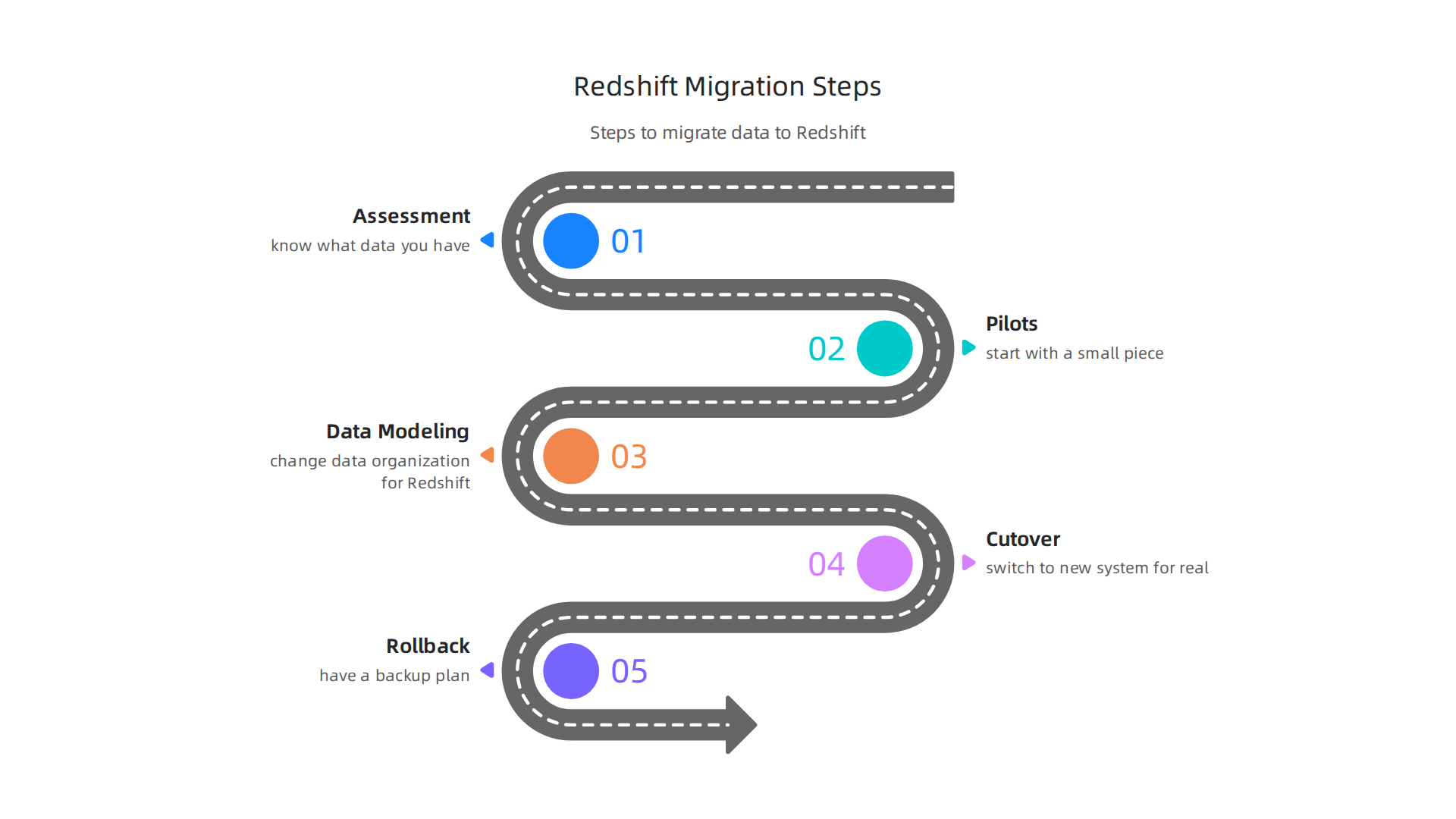
- Look at What You Have (Assessment): First, you need to know exactly what data you have, where it is, and how it’s used. This helps you understand what needs to move and how complex it might be. You’ll look at your current systems like databases, tables, and how they talk to each other to help plan for your new aws data warehouse.
- Try a Small Part (Pilots): Instead of moving everything at once, start with a small piece of data or a less important part of your system. This "pilot" run helps you learn what works well and what needs changing before you do the big move. It reduces surprises later on. This is a common strategy to make sure your Redshift Migration Strategy: A Guide to Minimal Downtime is successful.
- Plan Your New Data Shape (Data Modeling): When you move data to AWS Redshift, you might need to change how it’s organized to work best with Redshift’s design. This is called data modeling. It helps your data run faster for things like data mining and reports. AWS even has tools to help you with this conversion process What to consider when migrating data warehouse to Amazon Redshift.
- Make the Big Switch (Cutover): This is the moment you stop using your old system and start using AWS Redshift for real. It needs careful timing and checks to make sure all data has moved correctly and everything is working as it should. Usually, you’d do a full first load of data, then update with any changes that happen during the move How to Migrate Your Data Warehouse to AWS: Complete Guide.
- Have a Backup Plan (Rollback): What if something goes wrong during the switch? You need a "rollback" plan. This means you have a way to quickly go back to your old system if needed, so your business doesn’t stop. Most successful migrations also use methods like "lift and shift" where you move things with few changes, and run both old and new systems at the same time for a while to make sure everything matches up Data Warehouse Migration Guide: Snowflake, BigQuery, Redshift, ….
Using Redshift with Your Other Systems (Hybrid Approaches)
Sometimes, you don’t want to move all your data to AWS Redshift. Or maybe you want Redshift to work with data that stays in other places. This is where hybrid strategies come in.
- Querying Data from Different Places (Federated Queries): Imagine you have some data in your AWS Redshift and other data stored in Amazon S3 (a type of aws cloud storage) or even other databases. Federated queries let your AWS Redshift "reach out" and ask for data from these other sources without moving it all into Redshift first. This is super helpful for quick checks or when you don’t need all data in one spot.
- Making Data Look Unified (Data Virtualization): This is like having a special window that shows you all your data, no matter where it is stored. It makes data from different systems look like one big, connected database, even though it’s spread out. This helps people get insights faster without needing to know where each piece of data truly lives.
- Mixing Data Lakes and Data Warehouses (Lakehouse Models): Many businesses use "data lakes" for storing all kinds of raw data and "data warehouses" like AWS Redshift for structured data analysis. A lakehouse model brings these two together. It lets you use the best parts of both, helping you handle huge amounts of data for deep analysis and sophisticated data pipeline 2026 blueprint for building real time reliable infrastructure.
By carefully planning your migration and considering these hybrid options, you can make sure your move to AWS Redshift is a success in 2026. This allows you to get the most out of your data for faster insights and better business decisions.
Do you want to stay informed about the latest trends in technology and AI that impact enterprise leaders like you? The AI Newsletter Worth Reading delivers clear daily updates.
Summary
This article explains why AWS Redshift remains a core choice for enterprise data strategy in 2026 and walks through when and how to use it effectively. It covers strategic benefits—fast structured analytics, consolidated reporting, and tight AWS integration—and compares Redshift to lakehouse and other modern approaches so leaders can choose the right fit. The piece outlines common architectural patterns, ingestion methods (streaming, ETL/ELT), and how Redshift works with data lakes, BI tools, and AI platforms like SageMaker. It gives practical guidance on performance tuning (distribution/sort keys, compression, WLM, concurrency), cost control (right‑sizing, reserved capacity, pause/resume, query optimization), and security/governance (access control, encryption, auditing, cataloging). Finally, it presents a migration checklist and hybrid options such as federated queries and data virtualization so teams can move or extend workloads with minimal disruption.