
Strategic IT Asset Management Fuels Enterprise Success
Why IT asset management (ITAM) is a strategic priority for enterprises
Imagine a big company that owns many computers, software programs, and other tech gadgets. If they don’t keep a good list of all these things, where they are, and who uses them, they can run into big trouble. This is why IT asset management (ITAM) is so important. It’s like having a clear inventory for all the technology a company owns.
Without a strong IT asset management plan, businesses in 2026 face many risks. They might waste a lot of money buying new software they already have, or paying for services they don’t even use anymore. This poor inventory management software can make it hard to know what’s truly needed. Even worse, not knowing where all your systems and services technologies are can open the door to security problems. If a company doesn’t know which old software is running, it can’t fix security holes, making it easier for bad guys to get in. Also, companies need to follow rules and laws, and it’s much harder to do that if they don’t know what tech they own. This makes ITAM a must-have for safe and smart business operations.

To keep track of all these important items, companies often look for smart ways to manage their IT assets. One powerful tool that can help is Jira. While many know Jira for helping teams get work done, it can also be used for IT asset management workflows. When Jira is used with other tools that find all the tech devices a company has and build a big list of them, it becomes a strong way to manage IT stuff. This helps companies keep good records, stay safe, and save money. Understanding all the different tech parts of a business is key for leaders, and you can learn more about these areas in Enterprise Technology Domains Every Leader Must Understand in 2026.
Staying up to date with the latest in technology is a big task for leaders.
Get clear daily AI updates from The Deep View Newsletter.
The AI Newsletter Worth Reading
The business case for modern IT asset management
We talked about why IT asset management (ITAM) is important for running a safe and smart business. But let’s look closer at why it’s a very good idea for top leaders. Modern ITAM is much more than just a simple list of computers and software. It’s a smart way to help a company save money, stay safe, follow rules, and work better.
Here’s how ITAM helps a business in ways that leaders truly care about:
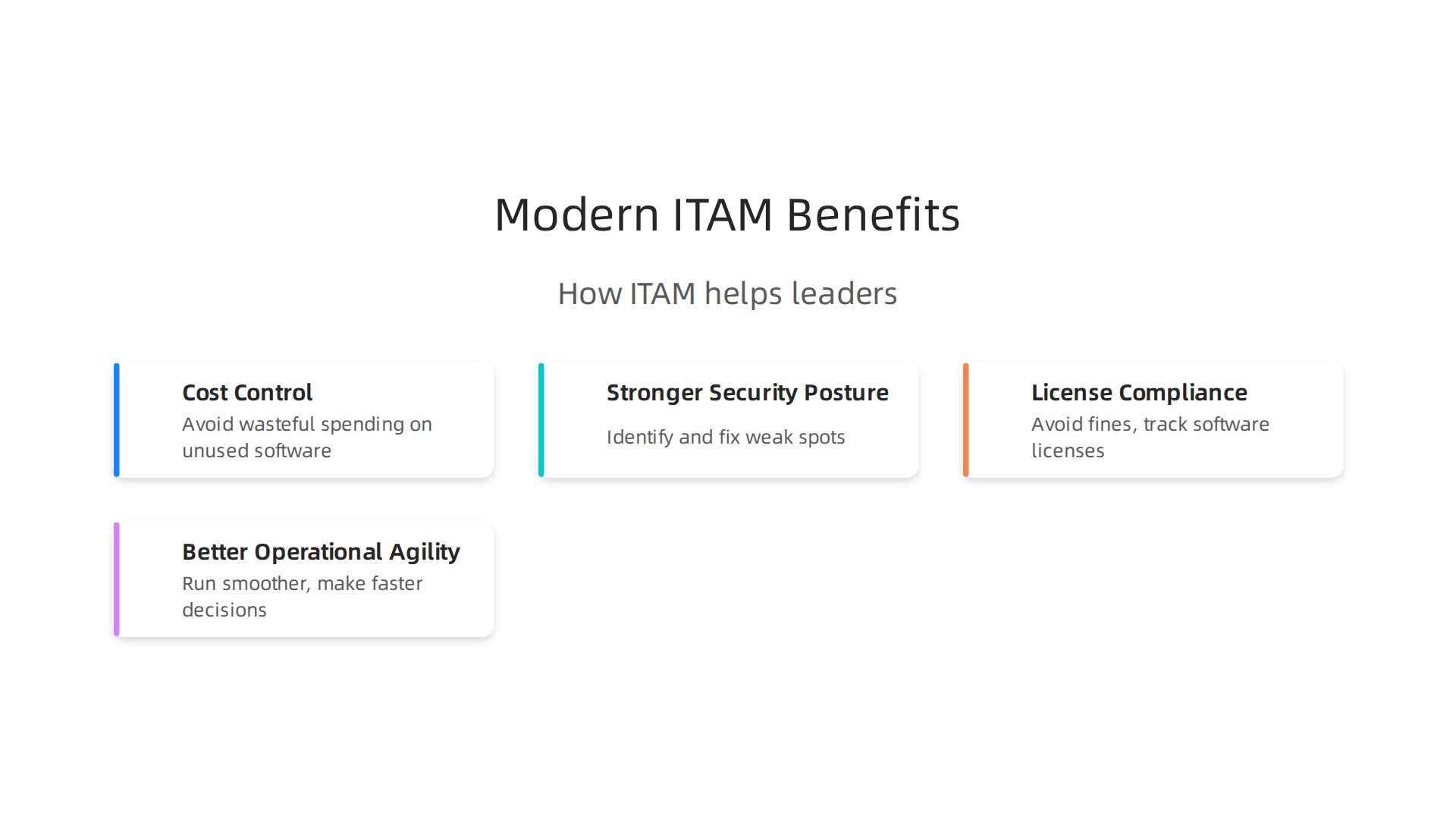
1. Cost Control
One of the biggest reasons for good ITAM is saving money. Companies often spend too much without realizing it. For example, they might buy new software licenses when they already have enough, or they might keep paying for software that no one uses anymore. This is where strong IT asset management comes in. It helps stop wasteful spending. One report shows that not keeping track of an IT asset can cost a company about $1,170 every year It Asset Management Industry Statistics | Fact-Checked 2026.
With ITAM, you know exactly what you have, so you don’t buy things twice. It also helps you get rid of old tech that costs money to maintain but isn’t used. This makes sure every dollar spent on technology is a smart dollar.

2. Stronger Security Posture
Knowing what technology you own is the first step to keeping it safe. Imagine trying to protect your home if you didn’t know how many doors or windows you had. It’s the same with a company’s systems and services technologies. ITAM gives you a clear picture of all your tech. This means you can find old software with security holes or devices that aren’t protected. Many IT leaders in 2026 are very worried about keeping data safe, and ITAM helps a lot with this by finding weak spots IT Asset Management Benchmarking Report.
3. License Compliance
Software often comes with many rules about how you can use it. These are called licenses. If a company breaks these rules, it can face big fines or even legal problems. ITAM helps you track all your software licenses. It makes sure you’re using the right number of licenses and following all the rules. This avoids costly mistakes. Key goals for ITAM include making sure a company follows license rules and does well in audits IT Asset Management KPIs & Metrics (2026): What Enterprises …. By keeping careful records, ITAM protects the company from these risks.
4. Better Operational Agility
When a company knows what technology it has, where it is, and who uses it, everything runs smoother. This is called operational agility. Teams can quickly find the right tools for new projects. If something breaks, they know exactly what needs fixing and what backups are available. This clear view of all IT assets helps teams make faster and smarter decisions, which is key for businesses in 2026 to stay ahead.
Compared to just a basic list of items, modern IT asset management covers the whole "life story" of each tech piece. It tracks who owns it, how it’s used, when it needs updates, and when it should be replaced. This full view helps leaders make big choices about technology, not just count things. The IT asset management software market is growing and is valued at $2.22 billion in 2026 45 IT Asset Management Statistics for 2026, showing how important it is for businesses today. Understanding all the different tech parts of a business is key for leaders, and you can learn more about these areas in Enterprise Technology Domains Every Leader Must Understand in 2026.
Staying up to date with the latest in technology is a big task for leaders. Get clear daily AI updates from The AI Newsletter Worth Reading.
Using modern IT asset management is a smart move for businesses. It helps save money and keep systems safe. But how does a popular tool like Jira fit into this important work? Many companies use Jira to keep track of tasks and projects. It can also play a big part in managing all the technology a company owns.
Integrating Jira into the IT asset lifecycle: patterns and pitfalls
Jira is often seen as a place to handle tasks and issues. However, with its special features like Jira Service Management, it can become a main control center for your it asset management efforts. It helps track hardware, software, and other systems and services technologies throughout their entire life.
Common ways Jira works with IT assets
Imagine Jira as the brain that connects all the different parts of managing your tech. Here are some common ways companies use Jira in their IT asset lifecycle:
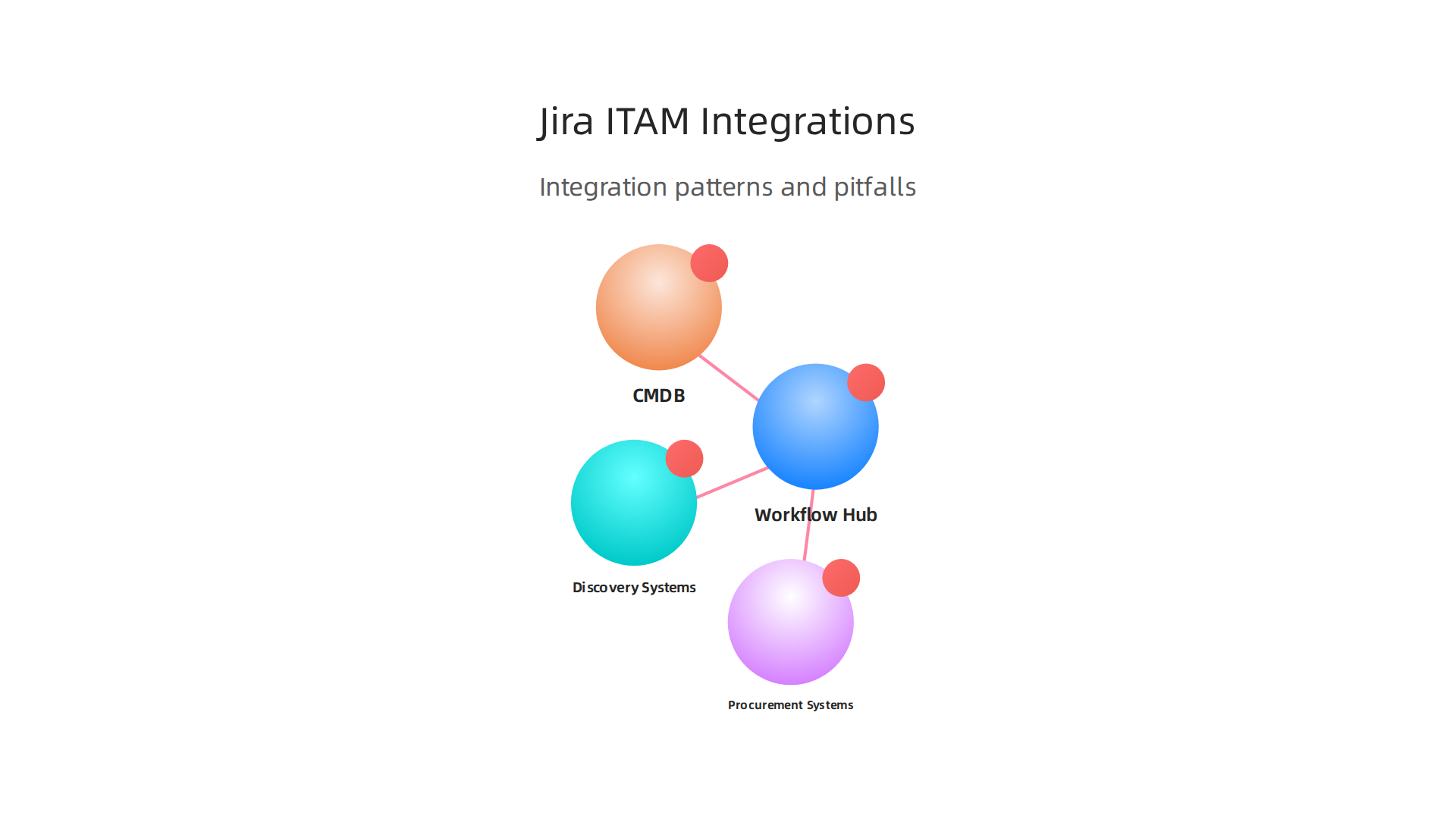
- Workflow Hub: Jira can be where all changes to an asset begin and end. When a new laptop is needed, an issue is created in Jira. When it’s given to an employee, or when it needs fixing, the
jira workflowguides these steps. Jira’s asset features help you keep track of all the items and how they relate to other things, like a service map A Guide to Asset & Config Management with JSM.

- Connecting to Other Systems: Jira doesn’t work alone. It links up with other special tools:
- Discovery Systems: These tools automatically find all the computers, phones, and software on your network. Jira can take this information to build a clear
inventory management softwarerecord of what you have. - CMDB (Configuration Management Database): This is like a detailed map of all your IT items and how they are connected. Jira can share information with the CMDB to make sure everyone knows what assets exist and how they impact each other Jira Asset Management Tools Differences.
- Procurement Systems: When a new device or software license is bought, this system handles the purchase. Jira can connect to it to update asset records right away. Many businesses look for integration with Jira for better ways to manage work The Top 6 Jira Integration Use Cases.
- Discovery Systems: These tools automatically find all the computers, phones, and software on your network. Jira can take this information to build a clear
What can go wrong when using Jira for ITAM?
While using Jira for ITAM has many good points, there are also some problems to watch out for:
- Separate Data: Sometimes, asset information might be stored in Jira and also in another system. This can lead to "data silos" where information is trapped in different places. If these systems don’t talk to each other well, you might have two different answers for the same question about an asset.
- Different Goals: ITAM is mostly about the cost and life of an asset, like when you buy it, use it, and get rid of it. A CMDB, on the other hand, is about how all the IT parts work together and depend on each other. If Jira is used for both, it’s important to make sure it handles both kinds of information correctly. As experts note, ITAM and CMDB are different but they work best together IT Asset Management Vs CMDB.
- Tickets vs. Records: Jira is very good at tracking "tickets," which are requests or problems. But managing IT assets means keeping long-term records about each item. Making sure Jira can do both well, without confusion, is a key challenge. Choosing the right tool for tracking your team’s workflow is important, and you can explore more options to understand which fits best for your needs in Trello Vs Jira 2026 Which Tool Fits Your Teams Workflow.
By knowing these common ways to use Jira and the possible problems, companies can make smarter choices about how to manage their IT assets better in 2026.
When managing IT assets, getting a full and clear picture of every piece of technology is super important. We talked about how Jira can help with workflows and tickets, but to truly manage your systems and services technologies, you need a solid record of everything you own. This is where a Configuration Management Database (CMDB), it asset management (ITAM), and discovery tools come together.
CMDB, ITAM, and discovery: building a single trusted asset record
It can be confusing to know the difference between a CMDB and ITAM, but they actually work hand-in-hand. Think of it like this:
- IT Asset Management (ITAM): This is all about the money side and the life journey of an asset. It tracks what you own, how much it cost, when you bought it, when its license expires, and when you should get rid of it. ITAM helps you save money and make sure you’re following the rules for software licenses.
- Configuration Management Database (CMDB): A CMDB is like a detailed map that shows how all your IT items are connected. It focuses on relationships. For example, it would show that your website server depends on a specific database, which runs on a certain physical machine. This helps your team understand what might break if one piece goes down. As experts point out, ITAM is about the lifecycle and cost, while a CMDB focuses on relationships and dependencies. Both are needed, not one over the other IT Asset Management Tools vs CMDB: One or Both?.
The goal is to bring these two ideas together to build a single, trusted record for every asset.

This means everyone in your company, from the IT help desk to the finance team, sees the same correct information about each laptop, server, or software license.
Finding your assets: discovery methods
To build that trusted record, you first need to find all your assets! This is where discovery tools come in. They automatically search your network for all your systems and services technologies. Here are common ways they do it, with their good points and bad points:
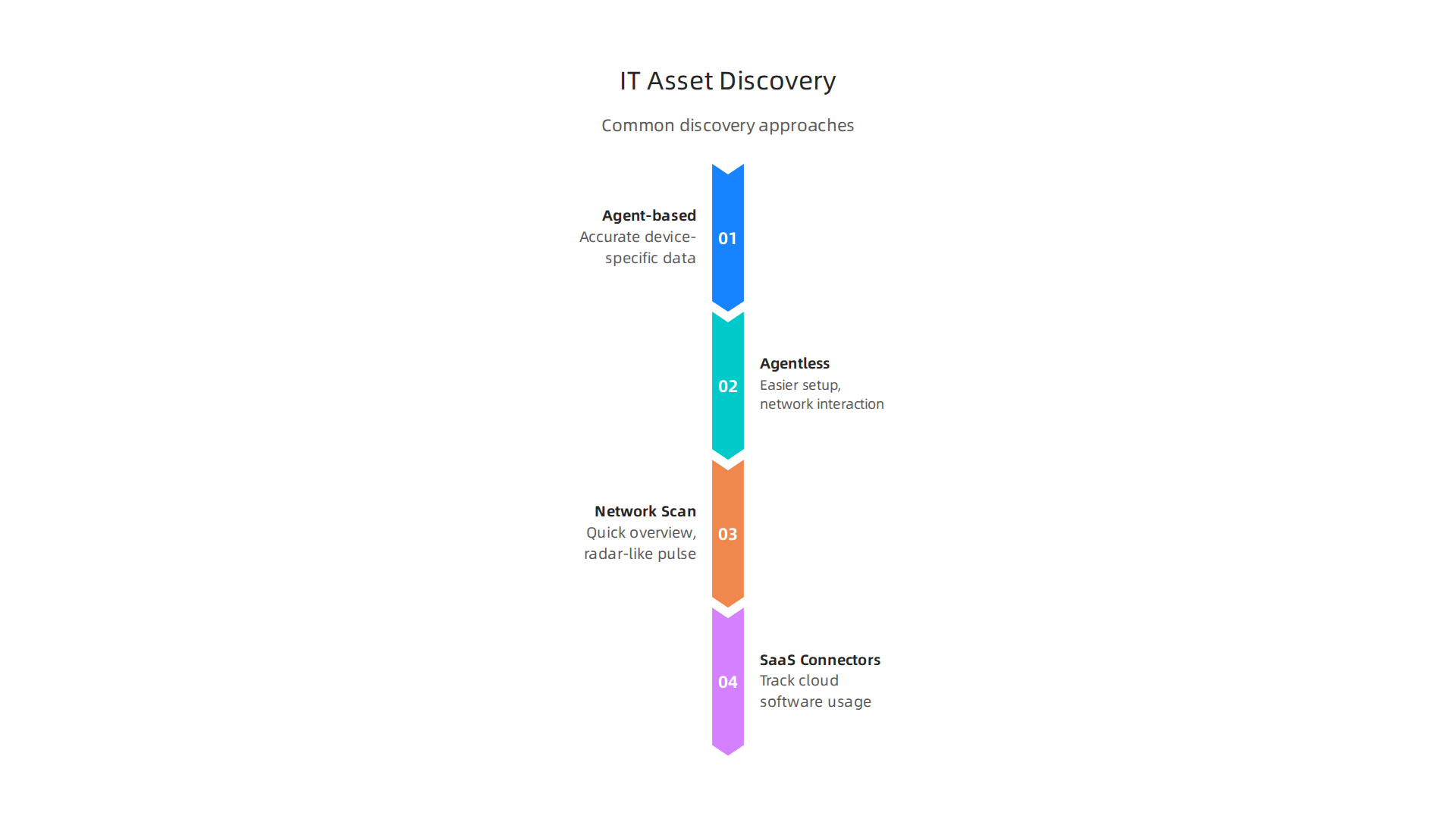
- Agent-based Discovery: This means you install a small program (an "agent") on each device. This agent then sends information back to your
inventory management software.- Good points: Very accurate and gives lots of detail about the device. Great for keeping tabs on assets that are always changing or moving.
- Bad points: Can be a lot of work to install agents on many devices.
- Agentless Discovery: These tools don’t need a program installed on each device. They can find assets by talking to them over the network.
- Good points: Easier to set up for many devices at once.
- Bad points: Might not get as much detail as agent-based methods.
- Network Scanning: This method actively scans your network to find devices. It’s like sending out a radar pulse to see what’s out there.
- Good points: Good for getting a quick overview of what’s on your network.
- Bad points: Can miss some devices or not provide deep information.
- SaaS Connectors: Many companies use software in the cloud (SaaS). Special connectors allow your
it asset managementsystem to talk directly to these cloud services (like Microsoft 365 or Salesforce) to gather information about software licenses and usage.- Good points: Perfect for tracking cloud-based software.
- Bad points: Relies on the cloud service having good data to share.
Choosing the right discovery tools is key to making sure your asset records are complete and up-to-date in 2026 Best IT Asset Discovery Tools in 2026. This helps your team make smart choices about their technology, from buying new software to fixing problems. It’s an important part of understanding all the enterprise technology domains every leader must understand in 2026.
Keeping up with all the changes in enterprise technology, including how ITAM, CMDB, and discovery are evolving, can be tough. It’s why many leaders look for clear, daily updates to stay informed.
Get clear daily AI updates from The Deep View Newsletter. The AI Newsletter Worth Reading
Finding all your systems and services technologies is just the first step. Once you have a clear picture of your IT assets, the next big job is to keep them safe, make sure they follow all the rules, and manage them well. This is where it asset management really shines, especially when you use tools like Jira to handle your daily tasks.
Security, compliance, and governance considerations for ITAM in Jira-driven environments
Your ITAM data is a powerful tool for keeping your technology secure and following all necessary rules. Think of your inventory management software as the brain that helps you make smart choices.
How ITAM helps with security
Having good it asset management data means you know exactly what hardware and software you have. This helps a lot with security:
- Finding Weak Spots: If a security threat comes out, you can quickly see which of your
systems and services technologiesmight be affected. Your ITAM record tells you what software versions are running and on which devices. This means you can find weak spots before attackers do. - Fixing Problems (Patching): When a new fix (a "patch") comes out for a software bug, you need to apply it quickly. ITAM helps you track which systems need that patch. It also helps you confirm that the patch was actually put in place. This is super important to keep your systems safe from attacks.
Staying compliant with rules
Compliance means following all the different rules and laws that apply to your business. This can be about software licenses, data privacy, or even industry-specific guidelines.
- License Compliance: Software licenses can be tricky. You need to make sure you’re not using more copies of a software than you paid for, and also not paying for licenses you don’t use. Your
it asset managementsystem tracks all your software licenses. This helps you avoid big fines and saves money. For example, standards like ISO/IEC 19770 guide how organizations manage software assets to ensure proper use and compliance with licensing rules IT Asset Management Frameworks and Standards. - Regulatory Documentation: Many industries have strict rules about how you manage your technology assets. ITAM helps you keep good records, so you can show auditors that you’re following all the necessary regulations. This means having clear tags on every asset that show its purpose, who owns it, and any special rules it needs to follow 10 Actionable IT Asset Management Best Practices for 2026.
Setting up good governance
Governance is all about how you guide and control the use of your IT assets. It makes sure everyone knows their role and follows the right steps.
- Clear Ownership: Every asset should have a clear owner. This person is responsible for that laptop, server, or software. Good ITAM practices help you assign and track this ownership. This helps prevent confusion and makes sure someone is always looking after each piece of technology. Experts suggest that clear ownership, along with regular checks, is a key part of good
it asset managementIT Asset Management: A Complete Guide to ITAM [2026]. - Access Rules: Not everyone should be able to change important asset information. Governance includes setting up who can see, change, or approve changes to your ITAM data. This helps keep your records accurate and secure.
- Audit Trails: It’s like having a logbook for every asset. An audit trail records every change made to an asset’s information and who made it. This is super important for figuring out problems and proving compliance during audits.
- Linking with Jira Workflows: In environments that use Jira, ITAM data can feed directly into your
jira workflow. For example, when an old laptop is retired, a Jira ticket can be automatically created to make sure its data is wiped and it’s removed frominventory management software. This ensures every step is followed and recorded. If you’re wondering how different tools fit into these workflows, you might find it helpful to compare options like Trello vs Jira 2026: Which Tool Fits Your Team’s Workflow.
By building strong security, compliance, and governance into your it asset management plans, you make sure your company’s technology is not only efficient but also safe and fully compliant with all rules in 2026.
When you have strong security, compliance, and governance for your technology, that is great. But how do you know if your efforts are working well? This is where measuring things comes in. You need to look at key numbers and create easy-to-understand reports. This helps you make smart choices about your it asset management plans.
Measuring impact: KPIs, dashboards, and reports that drive decisions
To really see how well your it asset management is doing, you need to track important numbers. These numbers are called Key Performance Indicators, or KPIs. They show you if you are saving money, making things safer, or working faster.
Important numbers to track
Think of KPIs as your scoreboard for ITAM. They tell you if you are winning. Here are some key KPIs that help you understand your systems and services technologies:
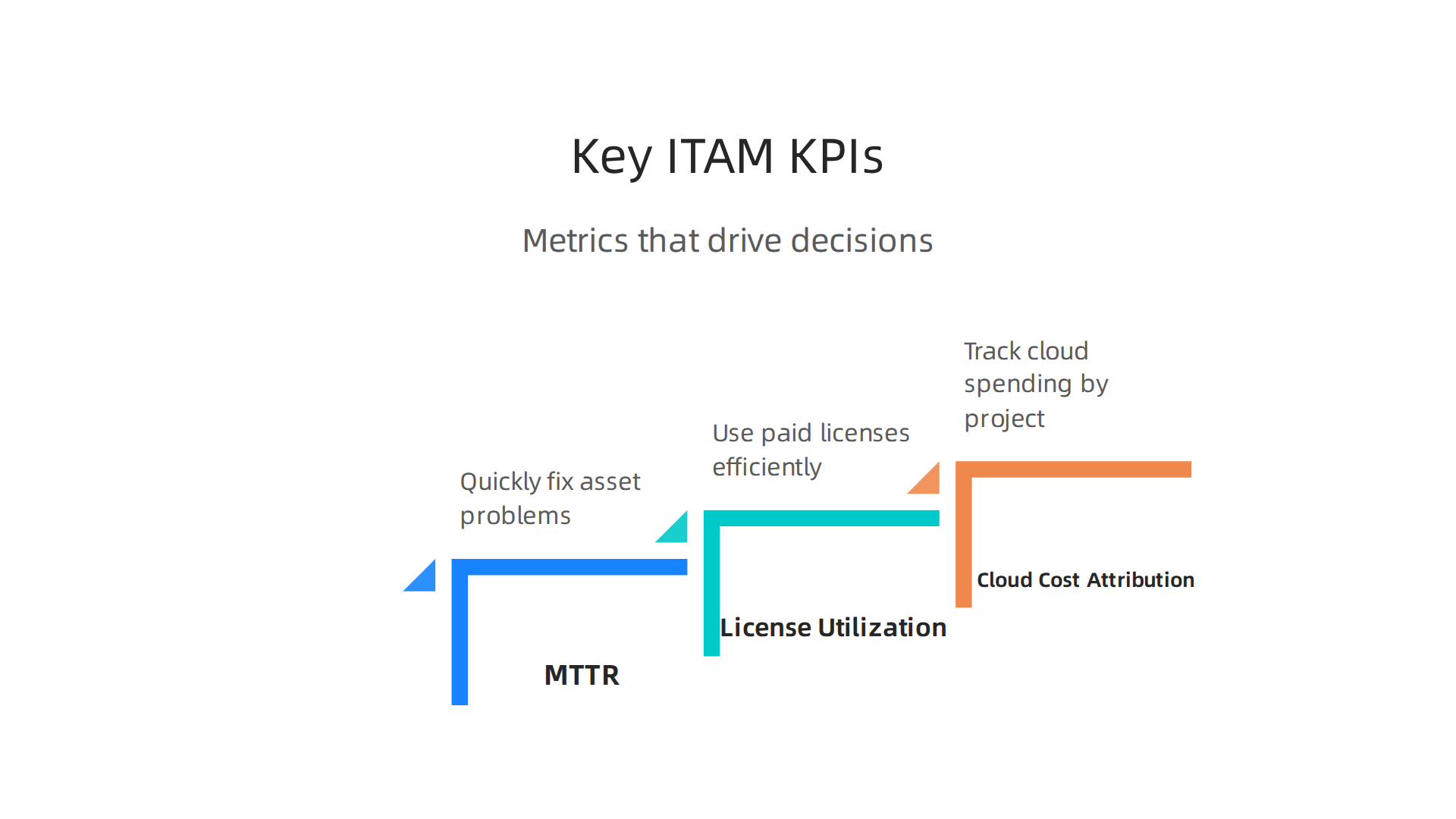
- Mean Time to Resolution (MTTR) for Asset Incidents: This is about how quickly you fix problems. For example, if a laptop breaks, how long does it take to get it working again or replace it? A shorter MTTR means your team is fast and your users are happy. You can track this easily in your
jira workflowby looking at tickets for asset repairs or replacements. - Software License Utilization: Are you using all the software licenses you pay for? Or are you paying for too many? This KPI helps you see if you are wasting money on unused software. Good
it asset managementsystems help you keep track of every license. Keeping an eye on these numbers can lead to big savings. Experts say ITAM KPIs often include things like lifecycle costs and software reclamation rates ITAM KPIs: Essential Metrics for Asset Management Success.

- Cloud Cost Attribution: Many companies use cloud services, which can get expensive. This KPI helps you figure out exactly which team or project is using what cloud resources and how much it costs. This way, you can see if cloud spending is fair and if there are ways to save money. For example, 84% of organizations find it hard to manage their cloud spending, which shows how important this KPI is 45 IT Asset Management Statistics for 2026.
You can get these numbers from your inventory management software and tools like Jira. They collect all the details about your assets and how they are used. Understanding these numbers is part of what we call Analytics Definition: What Enterprise Leaders Must Know for 2026.
Making sense of the numbers: Dashboards and reports
Once you have all this data, you need to show it in a way that helps people make decisions. Different people in your company need different kinds of information.
- For the Bosses (CIOs): Your Chief Information Officer (CIO) wants to see the big picture. They need reports that show how much money
it asset managementis saving, how much risk is reduced, and how efficient everything is. These reports should be simple and focus on the main trends. - For the Money People (Finance Teams): The finance team cares about the budget. They need reports on software license costs, hardware spending, and cloud expenses. They want to know if the company is getting good value for its technology investments.
- For the Security Team (Security Ops): The security team needs to know about risks. They want reports on systems that need updates, devices with known problems, or software that is out of date. They use this to make sure all your
systems and services technologiesare safe.
Good dashboards are like a control panel for your IT. They show these important numbers at a glance. Reports give more details and explain what the numbers mean. They help everyone understand the value of strong it asset management and make sure your technology works great for your business in 2026.
To keep up with all the fast changes in technology and learn how to use these insights, you can stay informed. Get clear daily AI updates from The AI Newsletter Worth Reading.
Knowing what to measure is a great start. Now, let’s talk about how you can actually put a strong it asset management system in place, especially using Jira. This isn’t something you do overnight. It’s a step-by-step journey, often taking 6 to 12 months to get things running smoothly. This roadmap will help you get there.
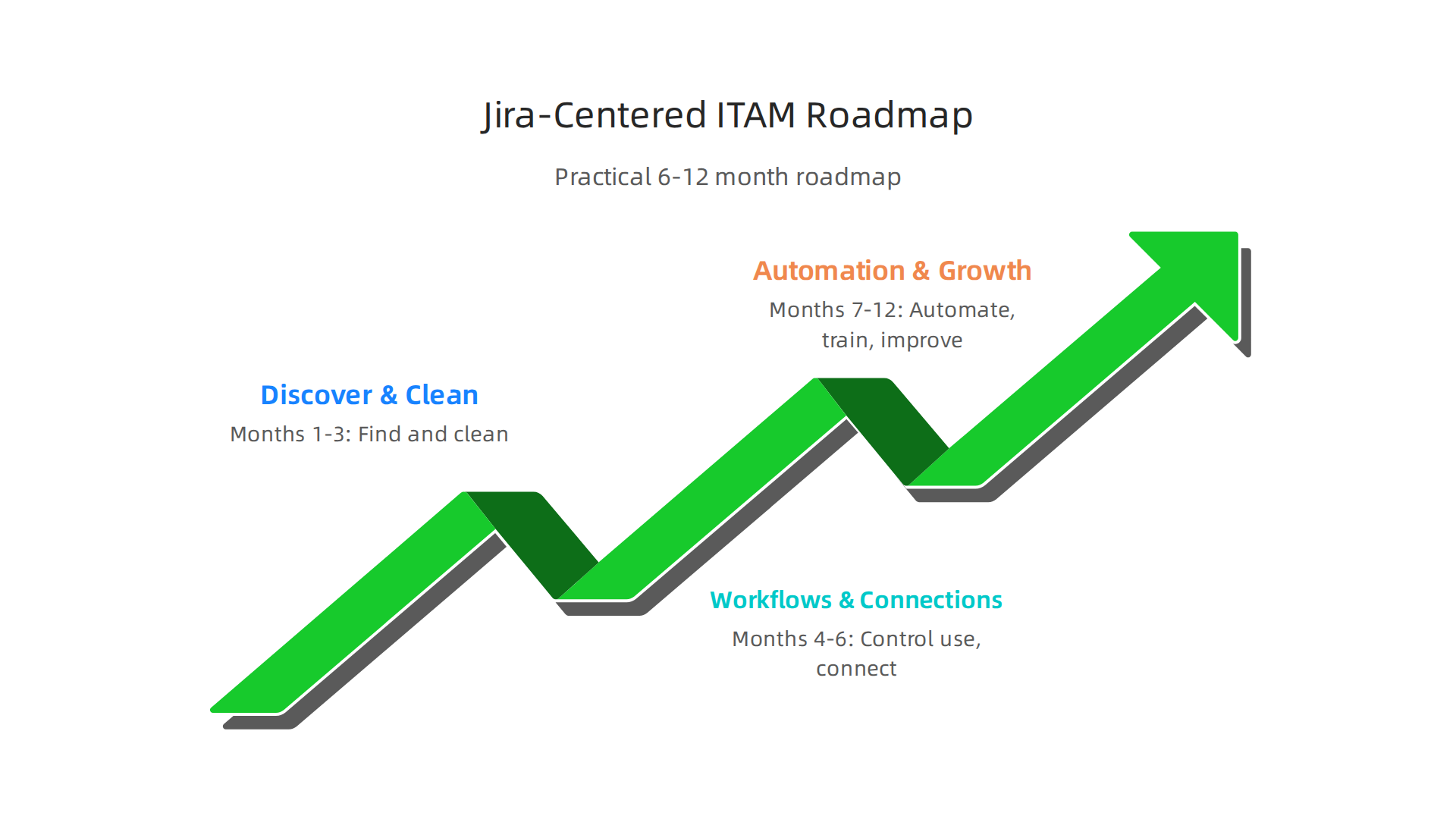
A practical 6-12 month roadmap for adopting Jira-centered ITAM
Building a good it asset management system with Jira involves clear steps. Many companies find that a well-planned approach makes all the difference. An ITAM implementation can range from a few months for basic setups to nearly a year or more for complex companies.
Phase 1: Finding and cleaning your data (Months 1-3)
First, you need to know what you have. This means finding all your IT assets.
- Discover everything: Go out and find all your computers, phones, software, and other tech items. Use tools to help you scan your network and see what’s connected.
- Clean up your information: Often, old records are messy or wrong. You need to fix this. Get rid of duplicate entries and update old information. This makes sure your asset list is correct.
- Set up Jira for assets: Start by getting Jira ready to store this information. You will create "object schemas" in Jira Assets (which acts like a CMDB, or Configuration Management Database) to hold details about your different types of assets. For example, you can create a schema for laptops and another for servers, defining what details each type of asset needs. This is a key step, as shown in guides on configuring an object schema for IT Asset Management (ITAM).
Having clean and correct data from the start is super important. It sets the stage for everything else. You can use your existing inventory management software to help gather this initial data.
Phase 2: Building strong workflows and connections (Months 4-6)
Once you know what assets you have, the next step is to control how they are used and managed.
- Decide where truth lives: For each important asset, figure out which system holds the most accurate and up-to-date information. This could be your financial system for costs, or Jira for its current user.
- Create Jira workflows: Design simple, clear steps for common tasks. Think about what happens when someone gets a new laptop, or when an old one needs to be replaced. These steps form your
jira workflow. For example, how does a request for a new device move from approval to purchase to setup? Jira Service Management can help you manage these processes effectively, as explained in guides like A Guide to Asset & Config Management with JSM. - Connect Jira to other tools: Jira doesn’t work alone. It needs to talk to your other
systems and services technologies, like your help desk software or purchasing systems. This way, all your systems share information and stay in sync. Learning how to connect these systems is an important part of making your ITAM effective. If you are curious about how Jira compares to other tools, you might want to read about Trello vs Jira 2026: Which tool fits your team’s workflow.
Phase 3: Making it easier with automation and continued growth (Months 7-12)
The last part of the roadmap focuses on making your ITAM system work smarter, not harder.
- Automate repetitive tasks: Find tasks that your team does over and over again. Can Jira do them automatically? For example, can it send an alert when a software license is about to expire? Automation saves time and reduces mistakes. There are guides, like the IT Asset Management Implementation Playbook for Jira Service Management, that offer detailed steps for setting up automation rules.
- Help your team adjust: People don’t always like change. Make sure your team understands why these new processes are important. Train them on how to use Jira for
it asset managementand explain how it makes their jobs easier. This is about making sure everyone is on board. - Choose vendors wisely: When you need new tools or services, pick partners that make things simpler, not more complicated. Look for vendors who understand your goals and can connect easily with your Jira setup. Avoid getting stuck with tools that don’t play well with your existing technology.
- Keep making it better: Your IT landscape is always changing, so your
it asset managementsystem should too. Regularly check your processes, look at your KPIs (the numbers we talked about before), and find ways to improve.
By following this roadmap, your business can build a strong it asset management system centered on Jira. This helps you manage your technology better, save money, and keep your business safe in 2026. For leaders guiding technology efforts, understanding the larger picture of how platforms are built and managed is crucial, which you can learn more about in a Platform Engineering in 2026: A Strategic Guide for CIOs and CTOs.
Summary
This article explains why IT asset management (ITAM) is a strategic priority for enterprises in 2026 and how tools like Jira can be used to run effective ITAM programs. It describes the business case—cost savings, stronger security, license compliance, and operational agility—then shows how Jira can act as a workflow hub when connected to discovery tools and a CMDB to build a trusted asset record. The piece walks through discovery options (agent, agentless, network scanning, SaaS connectors), highlights governance and compliance needs, and lists KPIs and dashboards that prove impact. It also covers common integration pitfalls, best practices for ownership and audit trails, and gives a practical 6–12 month roadmap to adopt a Jira-centered ITAM approach so teams can reduce risk, cut waste, and make faster decisions.